

Appearance
Welcome to EEforce
EEforce brings high-fidelity vector previews and design collaboration to your PCB workflow. Inspect layouts and schematics in detail, compare revisions, and discuss the exact spot you mean with comments and sketches — in the desktop app or in your browser with EEforce 365.
Your designs and their version history stay together on your company's server.
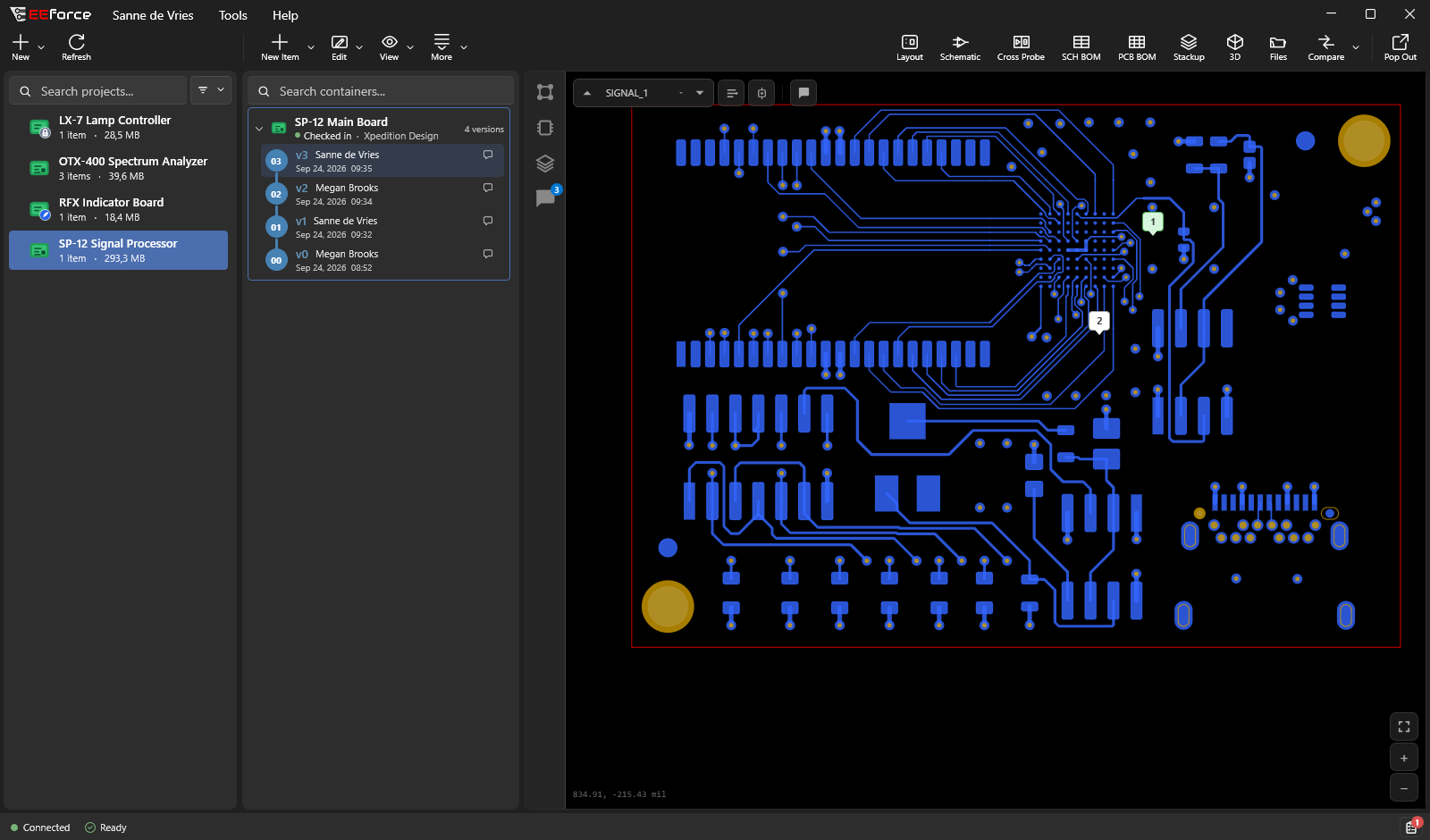
It is built for Siemens Xpedition and PADS Professional. When you check a board in, EEforce saves it as a new version, records who changed what, and makes sure two people never overwrite each other's work.
About the pictures in this guide
The screenshots show a fictional company, Kestrel Dynamics, which designs RF front ends and signal processors. You will meet the same people, projects and boards throughout the guide — for example Sanne de Vries, a PCB layout engineer, working on the SP-12 Main Board.
Get started
| Your task | Your next steps |
|---|---|
| Edit designs | Install the app, sign in, then check out a design. |
| Review designs | Open EEforce 365 with your usual account, or use the desktop viewer. |
| Manage the server | Start with server installation, then web administration. |
| Upgrade an existing installation | Read what changed in 26.12. |
What EEforce does for you
- One home for every design. Your boards live on a central server your company runs, not on personal drives.
- A traceable version history. Each check-in saves a new version. You can go back to any earlier one, and compare two versions to see what changed.
- See a board without opening a design tool. The built-in viewer shows the layout, schematic, cross-probe, bills of materials, layer stack-up and a 3D model, in seconds.
- Review together. Pin comments and sketches straight onto the board. New comments and replies show up for everyone as soon as they are posted, even inside Xpedition and PADS Professional.
- Stay in your design tool. The EEforce Companion on the editor's title bar saves new versions and shows the team's comments without leaving the tool. See Working in Xpedition & PADS Professional.
- Review from a browser. With EEforce 365, colleagues can look at designs, compare versions and comment from a web browser — nothing to install, and no licence seat needed. Project Managers can also decide there who has access.
- No accidental overwrites. Only one person edits a design at a time. Everyone else can still view it.
- Your files are always retrievable. Open or download any file from any version — see Browsing & Downloading Files.
How it fits together
EEforce has three parts. Most people install only the first one, and some don't install anything at all.

| Part | What it is |
|---|---|
| The EEforce app | The program you install on your Windows PC. You browse, preview, compare and comment here, and check designs out and in. Most of this guide happens in the app. |
| EEforce 365 | The EEforce viewer in your web browser. Open your server's address followed by /365 and sign in with your usual EEforce account. See Reviewing in the Browser. |
| The EEforce server | A central computer your IT team sets up once. It stores every design and version, and decides who can see and change what. You never have to manage it — you just connect to it. |
TIP
If your company has already set up the server, all you need is the app and your sign-in details. Go to Installing EEforce and then Signing In.
Only want to look at a design? Open EEforce 365 in your browser instead.
The three things to know
Everything in EEforce is built from three simple ideas.
Projects hold related work — usually one product. A project holds one or more designs, and you can group them into folders. At Kestrel Dynamics, the OTX-400 Spectrum Analyzer project holds the analyzer's analog front end, its display module and a generic container of specifications.
Designs (also called containers) are the things you version: a board from Xpedition or PADS Professional, or a Generic Container of other files such as datasheets, specifications and BOM drafts. Each design is treated as one complete object.
Versions are the saved history of a design. Every check-in adds a new version on top. The first version is v0, the next v1, and so on.
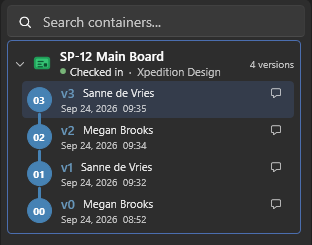
What you can do in a project depends on your role there: a Viewer can look and comment, a Contributor can also check designs out and in, and a Manager has full control. See Access & Roles.
What's new in 26.12
Version 26.12 is the biggest EEforce release so far:
- High-fidelity vector previews of layouts and schematics, with cross-probe, measuring and net highlighting, plus a PCB specification and an Assembly Assistant on the 3D board
- Comments and sketches on the design, with live conversations across the team
- A redesigned desktop app that brings projects, versions, and review together
- Compare two versions of a board, or two different boards
- The EEforce Companion in Xpedition and PADS Professional: save versions and review comments inside the design tool
- EEforce 365 — review designs in a web browser, with no licence seat
- A new web administration for users, groups, projects, licences, storage and the audit trail, with a Storage Assistant that shows where the space goes, prunes old versions in bulk and restores from the trash
- Designs stay readable and downloadable even if the server licence expires
See What's New in 26.12 for the full list.
Where to go next
- Installing EEforce — get the app onto your PC
- Signing In — connect to your company's server
- A Tour of the Window — find your way around
- Previewing Designs — the built-in viewer